Quick Answer: What is the TLS Handshake?
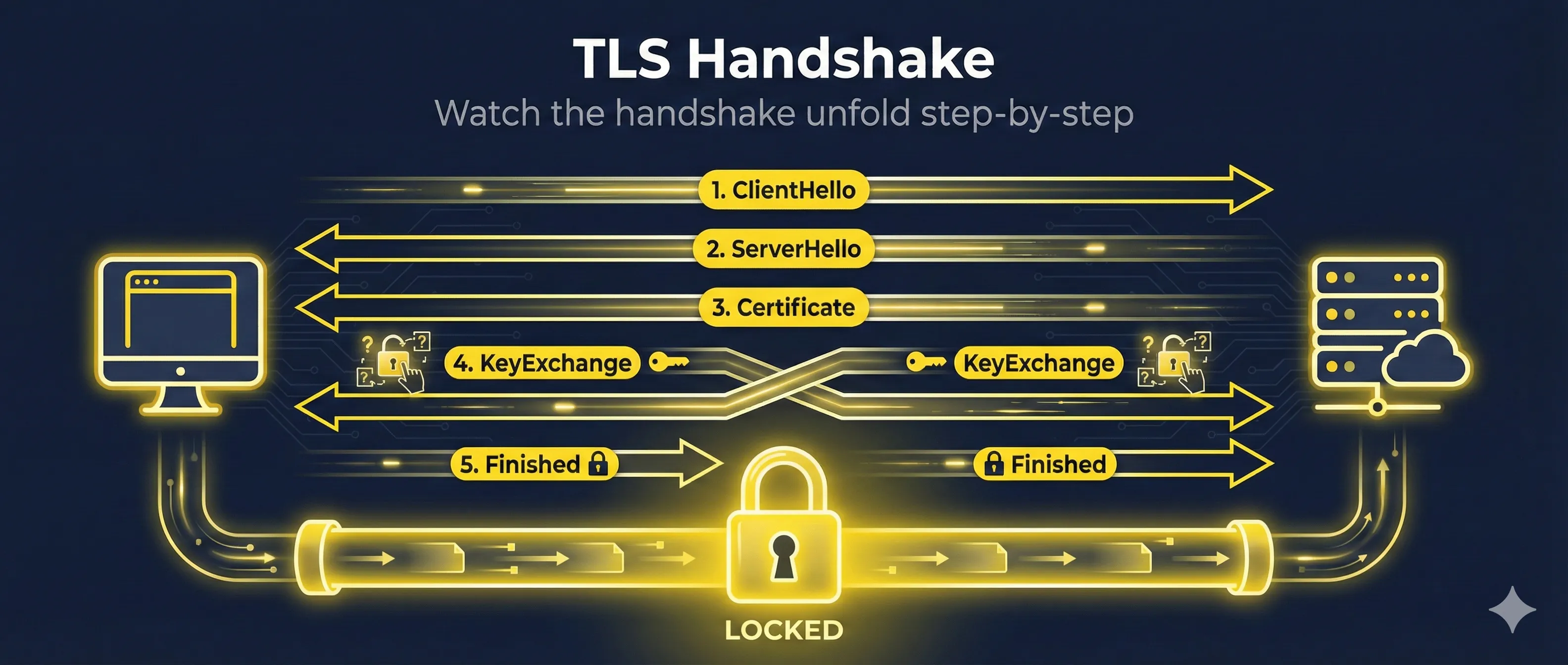
The TLS handshake is the process where a client and server establish a secure, encrypted connection. They agree on encryption methods, exchange keys, and verify identities before any data is transmitted.
The handshake happens in milliseconds (50-200ms typically) before any HTTP data is sent. Every HTTPS connection starts with a TLS handshake.
TLS 1.2 Handshake (Step-by-Step)
TLS 1.2 requires 2 round trips between client and server to complete the handshake. Here's what happens in each message:
Note: This shows the classic TLS 1.2 flow. Modern deployments typically use ECDHE-based cipher suites for forward secrecy, where both sides exchange ephemeral public keys instead of the RSA key exchange pattern shown in step 5.
Client initiates connection by sending:
- • TLS version (1.2)
- • List of supported cipher suites
- • Client random number (32 bytes)
- • Session ID (for resumption)
- • SNI extension (server hostname)
Server responds with its selections:
- • Chosen TLS version
- • Selected cipher suite
- • Server random number (32 bytes)
- • Session ID
Server sends its certificate chain for identity verification. The client validates the chain up to a trusted root CA.
Server signals it's finished sending hello messages. The client now processes everything and prepares its response.
RSA key exchange: Client sends the "pre-master secret" encrypted with the server's public key. Both sides calculate the master secret independently.
With ECDHE (preferred): Client sends its ephemeral public key instead, and both sides derive the shared secret via key agreement—providing forward secrecy.
Client signals: "I'm switching to encrypted communication now."
First encrypted message! Contains a hash of all handshake messages. Server verifies this to confirm the client has the correct keys.
Server sends its own Finished message. Both sides now have verified they share the same encryption keys. The secure connection is established!
TLS 1.2 Round Trips
TLS 1.2 takes 2 full round trips before sending data. On a connection with 100ms latency, that's 200ms of handshake time before any content loads.
TLS 1.3 Handshake (Faster & Safer)
TLS 1.3 reduces the handshake to just 1 round trip and encrypts more of the handshake itself for better privacy. The client's first message includes key shares, SNI, and supported parameters—after which almost everything is encrypted in a single flight.
Client sends everything needed upfront:
- • Supported TLS versions (1.3 only sends 1.3)
- • Supported cipher suites
- • Key shares for likely key exchange algorithms
- • Client random
Server responds with:
- • Selected cipher suite
- • Server's key share
- • Server random
These are all sent together, encrypted:
- • {EncryptedExtensions} - Server parameters
- • {Certificate} - Server's certificate (now encrypted!)
- • {CertificateVerify} - Signature proving server owns the certificate
- • {Finished} - Handshake verification hash
Client sends its Finished message. The handshake is complete!
TLS 1.3 Improvements
- ✓ 1 round trip instead of 2 (50% faster)
- ✓ Certificate encrypted (privacy: observers can't see which site)
- ✓ No more RSA key exchange (mandatory forward secrecy)
- ✓ Removed weak ciphers (SHA-1, RC4, DES, 3DES all gone)
TLS Handshake Timeline Comparison
Round trips required before encrypted data can flow
Key Exchange Explained
The key exchange is how client and server agree on encryption keys without ever sending the actual keys over the network.
RSA Key Exchange (TLS 1.2)
- 1. Client generates random pre-master secret
- 2. Encrypts it with server's public key
- 3. Server decrypts with private key
- 4. Both derive session keys from pre-master
ECDHE Key Exchange (TLS 1.3)
- 1. Both sides generate ephemeral key pairs
- 2. Exchange public keys
- 3. Each side calculates shared secret independently
- 4. Ephemeral keys are discarded after handshake
Common Key Exchange Algorithms
- ECDHE_RSA— Ephemeral Elliptic Curve Diffie-Hellman (recommended)
- ECDHE_ECDSA— ECDHE with ECDSA certificates
- X25519— Modern curve, TLS 1.3 default
- P-256— NIST curve, widely supported
Forward Secrecy Explained
Why ECDHE is more secure than RSA key exchange
TLS 1.3 requires forward secrecy - RSA key exchange is not allowed.
Certificate Verification During Handshake
When the server sends its certificate, the client performs these checks:
- Chain validation: Verify each certificate is signed by the next until reaching a trusted root
- Hostname match: Certificate's CN or SAN matches the requested domain
- Validity period: Current time is within notBefore and notAfter dates
- Revocation check: Certificate not on CRL or flagged by OCSP
- Key usage: Certificate is allowed for TLS server authentication
What Happens If Verification Fails
If any check fails, the client aborts the handshake and shows a certificate error. The connection is never established, protecting the user from potentially malicious servers.
Certificate Verification Steps
What the client checks before trusting a certificate
TLS 1.2 vs TLS 1.3 Comparison
| Feature | TLS 1.2 | TLS 1.3 |
|---|---|---|
| Handshake Round Trips | 2 RTT | 1 RTT |
| 0-RTT Resumption | No | Yes |
| Forward Secrecy | Optional (ECDHE) | Mandatory |
| Certificate Encrypted | No (visible to observers) | Yes |
| RSA Key Exchange | Supported | Removed |
| Cipher Suites | 37 supported | 5 supported (secure only) |
| SHA-1, MD5, 3DES | Available | Removed |
Debugging Handshake Issues
View Handshake Details with OpenSSL
# Full handshake with verbose debug output
openssl s_client -connect example.com:443 -state -debug
# Show only the negotiated protocol and cipher
openssl s_client -connect example.com:443 < /dev/null 2>&1 | grep -E 'Protocol|Cipher'
# Force TLS 1.2
openssl s_client -connect example.com:443 -tls1_2
# Force TLS 1.3
openssl s_client -connect example.com:443 -tls1_3
Common Handshake Errors
SSL_ERROR_HANDSHAKE_FAILURE
Client and server couldn't agree on cipher suite or TLS version. Check that both support compatible ciphers.
CERTIFICATE_VERIFY_FAILED
Certificate validation failed—expired, wrong hostname, or untrusted CA. Check the certificate chain with openssl verify.
Connection Reset During Handshake
Often a firewall or load balancer issue. Can also be caused by SNI mismatch or client IP blocking.
0-RTT Resumption (TLS 1.3)
TLS 1.3 introduces 0-RTT (zero round trip time) resumption, allowing clients to send encrypted data immediately when reconnecting to a server they've visited before.
0-RTT Session Resumption
TLS 1.3 can send encrypted data immediately on repeat connections
How 0-RTT Works
- 1. First connection: Normal TLS 1.3 handshake occurs
- 2. Server sends "resumption ticket" at end of session
- 3. Client stores ticket encrypted with a key
- 4. Reconnection: Client sends ClientHello + encrypted data immediately
- 5. Server decrypts using the resumption secret
Benefits
- • Zero latency for returning visitors
- • Faster page loads on repeat visits
- • Great for APIs with persistent clients
Risks
- • Replay attacks possible on 0-RTT data
- • Only use for idempotent requests (GET)
- • Never use for state-changing operations
Enterprise note: Many organizations disable 0-RTT entirely because of replay risk. Don't feel obligated to enable it—the latency savings rarely outweigh the security complexity for most applications.
Related Resources
How TLS Works
Get the complete overview of TLS protocol operation.
Cipher Suite Decoder
Decode and understand the cipher suites negotiated during handshake.
Forward Secrecy
Learn why ephemeral key exchange protects past sessions.
Key Exchange
Deep dive into ECDHE, X25519, and key agreement algorithms.
TLS Version Comparison
Compare TLS 1.0, 1.1, 1.2, and 1.3 differences and security.
Encrypted Client Hello (ECH)
How ECH adds a second encrypted ClientHello to hide the real SNI from network observers.
Frequently Asked Questions
How long does a TLS handshake take?
Typically 50-300ms depending on network latency. TLS 1.2 takes about 2x the round-trip time (RTT), while TLS 1.3 takes about 1x RTT. On a 50ms connection, expect ~100ms for TLS 1.2 and ~50ms for TLS 1.3. See the TLS 1.2 vs 1.3 timeline diagram above for a visual comparison.
Does every request do a new handshake?
No. Once established, the TLS session stays open for multiple HTTP requests (HTTP/1.1 keep-alive or HTTP/2 multiplexing). Session resumption also allows faster reconnection if the connection drops.
What if client and server support different TLS versions?
They negotiate to the highest version both support. A TLS 1.3 client connecting to a TLS 1.2 server will use TLS 1.2. Modern browsers require at least TLS 1.2.
Can the handshake be intercepted?
The handshake itself is partially visible (especially in TLS 1.2), but the session keys are never transmitted. In TLS 1.3, even the certificate is encrypted, hiding which site the user is visiting from network observers.
Should I disable TLS 1.2?
Not yet for most sites. While TLS 1.3 is better, some older clients (especially enterprise systems) still require TLS 1.2. Support both, but prioritize TLS 1.3 in your cipher suite order.
Watch it happen in real-time
See every step of the TLS 1.2 and 1.3 handshakes animated in our interactive demo.
Try the TLS Handshake Demo