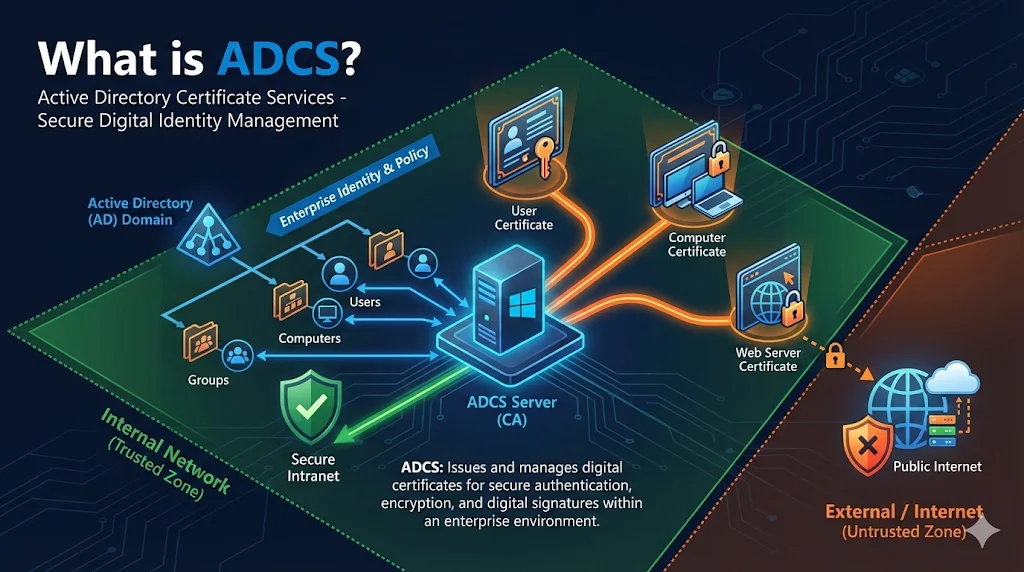
What is ADCS?
Active Directory Certificate Services (ADCS) is Microsoft's built-in Certificate Authority that comes with Windows Server. It lets you issue certificates for internal use - things like Wi-Fi authentication, VPN, code signing, document encryption, and internal websites.
Think of ADCS as your organization's own certificate factory. Instead of paying a public Certificate Authority for every internal certificate you need, you run your own CA that creates certificates trusted within your company.
ADCS vs Public CAs
| Aspect | ADCS (Private CA) | Public CA (DigiCert, Let's Encrypt) |
|---|---|---|
| Trust Scope | Your organization only | Entire internet |
| Cost | Windows Server license | Per-cert or subscription |
| Use Cases | Internal services, devices, users | Public websites |
| Browser Trust | Must deploy root cert | Already trusted |
| Validation | You control it | CA validates you |
| Certificate Types | Unlimited custom templates | Standard offerings |
When to Use ADCS
Good Fit
- Internal web applications
- Wi-Fi (802.1X) and VPN authentication
- Smart card logon
- Code signing for internal apps
- Email encryption (S/MIME) internally
- Device certificates for MDM
- Internal API mTLS
Don't Use For
- Public-facing websites (users would see certificate warnings)
- Anything external users access
- Mobile apps distributed publicly
Why not? External users don't have your root certificate installed. They'll see scary "Your connection is not private" warnings.
What You Get with ADCS
ADCS includes several components that work together to provide a complete enterprise PKI:
Certification Authority (CA) role
The core service that issues and manages certificates
Certificate Templates
Blueprints that define certificate properties and permissions
Autoenrollment via Group Policy
Automatic certificate deployment to users and computers
Web Enrollment
Browser-based certificate requests for manual enrollment
NDES (Network Device Enrollment Service)
SCEP protocol support for network devices and mobile
OCSP Responder
Real-time certificate revocation status checking
Next Steps
Related Resources
ADCS Architecture
Root CA, Issuing CA, and two-tier PKI hierarchy explained.
Certificate Templates
Blueprints for certificate properties and permissions.
Autoenrollment
Automatic certificate deployment via Group Policy.
NDES Guide
SCEP protocol for network devices and mobile.
ADCS Security
ESC1-ESC8 attacks and security hardening.
CA Hierarchy Guide
Certificate chain of trust fundamentals.