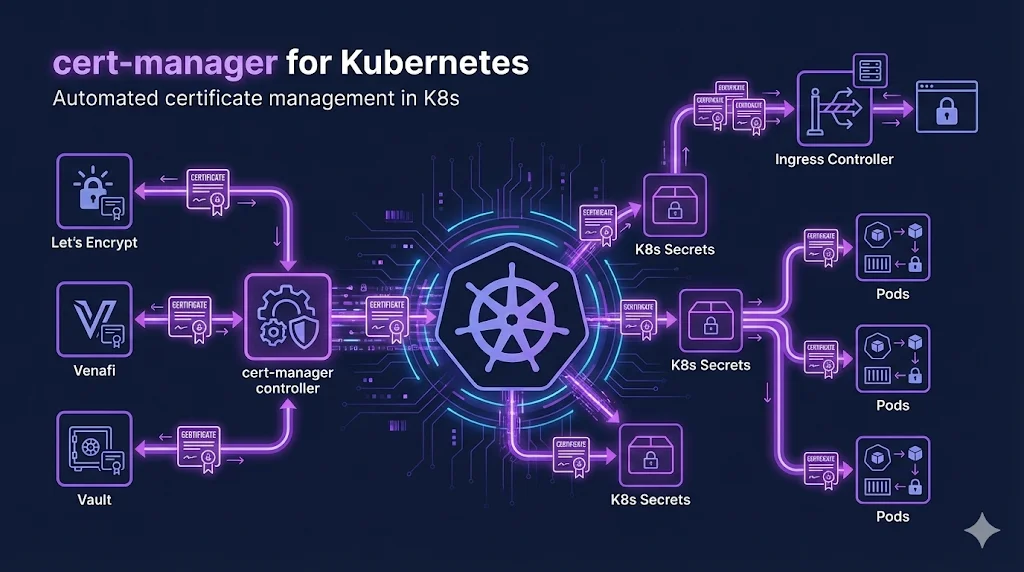
TL;DR
cert-manager automates certificate issuance and renewal in Kubernetes. Install it, create an Issuer pointing to Let's Encrypt (or your CA), create a Certificate resource, and cert-manager handles the rest—including automatic renewal 30 days before expiry.
What is cert-manager?
cert-manager is a Kubernetes-native certificate management controller. It runs in your cluster and:
- Watches for Certificate custom resources
- Communicates with CAs (Let's Encrypt, Venafi, Vault, etc.)
- Handles ACME challenges automatically
- Stores certificates as Kubernetes Secrets
- Renews certificates before they expire
Installation
Using Helm (Recommended)
helm repo add jetstack https://charts.jetstack.io
helm repo update
helm install cert-manager jetstack/cert-manager \
  --namespace cert-manager \
  --create-namespace \
  --set installCRDs=true
Using kubectl
kubectl apply -f https://github.com/cert-manager/cert-manager/releases/download/v1.14.0/cert-manager.yaml
Verify Installation
kubectl get pods -n cert-manager
# Should show: cert-manager, cert-manager-cainjector, cert-manager-webhook
Configuring Issuers
Issuers define how to obtain certificates. Use ClusterIssuer for cluster-wide access or Issuer for namespace-scoped.
Let's Encrypt (Production)
apiVersion: cert-manager.io/v1
kind: ClusterIssuer
metadata:
  name: letsencrypt-prod
spec:
  acme:
    server: https://acme-v02.api.letsencrypt.org/directory
    email: your-email@example.com
    privateKeySecretRef:
      name: letsencrypt-prod-key
    solvers:
    - http01:
        ingress:
          class: nginx
Let's Encrypt (Staging)
Always test with staging first! Let's Encrypt has rate limits. Staging issues untrusted certs but has much higher limits.
apiVersion: cert-manager.io/v1
kind: ClusterIssuer
metadata:
  name: letsencrypt-staging
spec:
  acme:
    server: https://acme-staging-v02.api.letsencrypt.org/directory
    email: your-email@example.com
    privateKeySecretRef:
      name: letsencrypt-staging-key
    solvers:
    - http01:
        ingress:
          class: nginx
Creating Certificates
apiVersion: cert-manager.io/v1
kind: Certificate
metadata:
  name: example-com-tls
  namespace: default
spec:
  secretName: example-com-tls-secret
  issuerRef:
    name: letsencrypt-prod
    kind: ClusterIssuer
  dnsNames:
  - example.com
  - www.example.com
When you apply this, cert-manager will:
- 1. Create a Certificate Request
- 2. Perform the ACME challenge (HTTP-01 or DNS-01)
- 3. Store the certificate in a Secret named
example-com-tls-secret - 4. Automatically renew before expiry
Challenge Types
HTTP-01
- + Simple setup
- + Works with any ingress
- - No wildcard support
- - Needs port 80 accessible
DNS-01
- + Wildcard support
- + Works without ingress
- - Requires DNS provider integration
- - More complex setup
Troubleshooting
Check Certificate Status
kubectl get certificates -A
Describe Certificate
kubectl describe certificate <name> -n <namespace>
Check Challenges
kubectl get challenges -A
View cert-manager Logs
kubectl logs -n cert-manager deploy/cert-manager
Common Errors
- Waiting for HTTP-01 challenge: Check ingress/firewall
- ACME server rejected: Rate limited—use staging
- secret not found: Check secretName matches
- issuer not ready: Check issuer configuration
Venafi Integration
For enterprise environments, cert-manager integrates with Venafi TPP and Venafi as a Service:
apiVersion: cert-manager.io/v1
kind: ClusterIssuer
metadata:
  name: venafi-tpp
spec:
  venafi:
    zone: "DevOps\\Kubernetes"
    tpp:
      url: https://tpp.example.com/vedsdk
      credentialsRef:
        name: venafi-tpp-credentials
Benefits of Venafi + cert-manager
- + Policy enforcement before issuance
- + Visibility into all K8s certificates
- + Integration with enterprise CA
- + Compliance reporting
Best Practices
- Always test with Let's Encrypt staging first
- Use ClusterIssuer for shared issuers across namespaces
- Monitor certificate expiry with Prometheus metrics
- Use reloader to auto-restart pods when secrets change
- Set up alerts for certificate renewal failures
Related Resources
Cloud PKI Comparison
Compare AWS ACM, Azure Key Vault, GCP CAS, and HashiCorp Vault.
ACME Protocol
Deep dive into the protocol that powers Let's Encrypt and cert-manager.
Let's Encrypt Troubleshooting
Fix common cert-manager and ACME issuance errors.
Certificate Lifecycle
Understand the full certificate lifecycle managed by cert-manager.
CA Hierarchy Design
Design the CA infrastructure for your Kubernetes certificate issuers.
SPIFFE & SPIRE Workload Identity
Attestation-based workload identity for Kubernetes — short-lived certs without secrets in images.