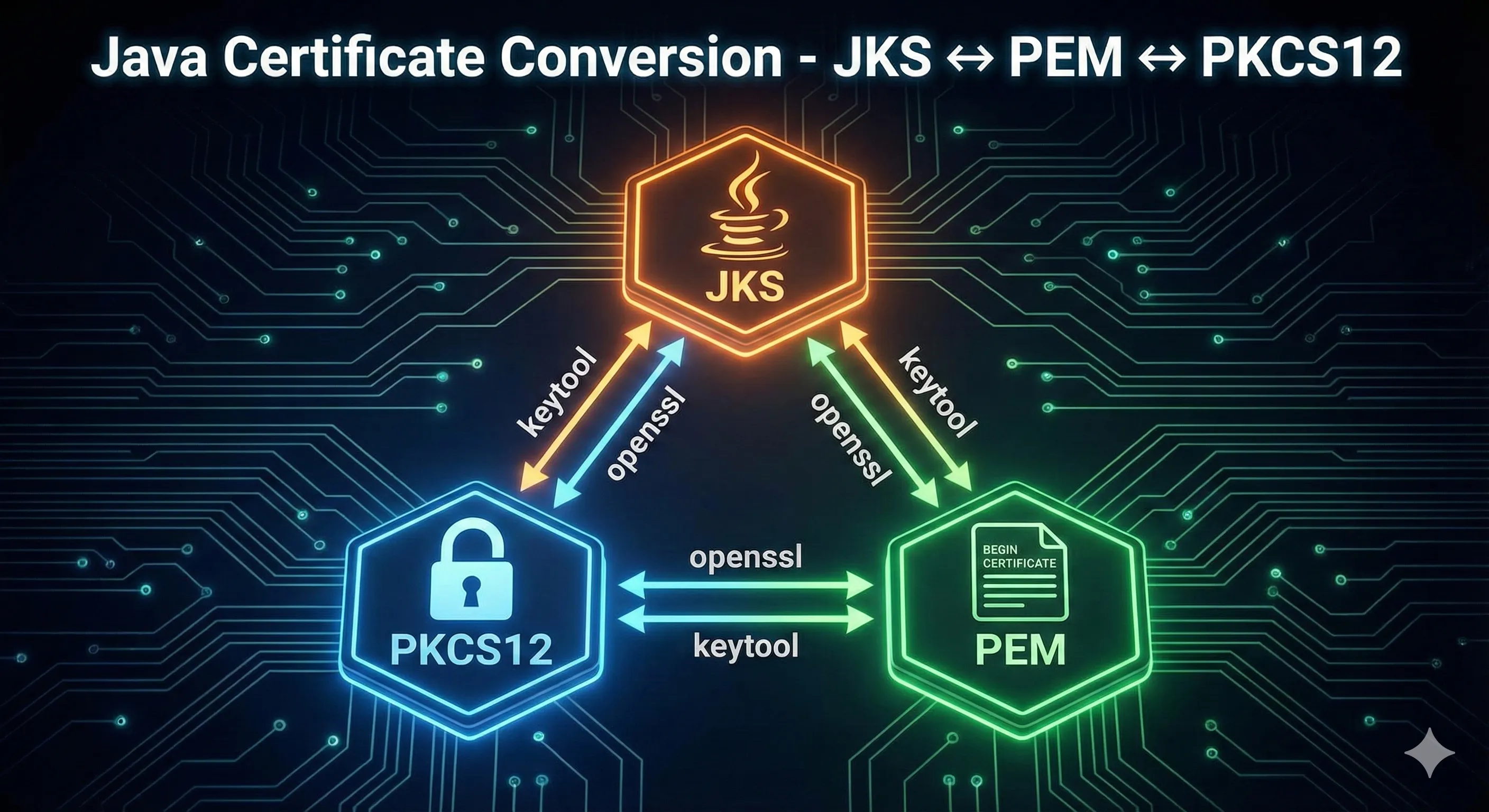
Conversion Quick Reference
| From | To | Tool | Steps |
|---|---|---|---|
| JKS | PKCS12 | keytool | 1 step |
| PKCS12 | JKS | keytool | 1 step |
| PKCS12 | PEM | openssl | 1 step |
| PEM | PKCS12 | openssl | 1 step |
| JKS | PEM | keytool + openssl | 2 steps |
| PEM | JKS | openssl + keytool | 2 steps |
JKS → PKCS12
Convert from Java's legacy JKS format to the industry-standard PKCS12 format.
Convert Entire Keystore
keytool -importkeystore \
  -srckeystore keystore.jks \
  -srcstoretype JKS \
  -srcstorepass changeit \
  -destkeystore keystore.p12 \
  -deststoretype PKCS12 \
  -deststorepass changeit
Convert Specific Alias
keytool -importkeystore \
  -srckeystore keystore.jks \
  -srcstoretype JKS \
  -srcstorepass changeit \
  -srcalias mykey \
  -destkeystore keystore.p12 \
  -deststoretype PKCS12 \
  -deststorepass changeit \
  -destalias mykey
Tip: PKCS12 is now the default format in Java 9+. Oracle recommends migrating all JKS keystores to PKCS12.
PKCS12 → JKS
Convert PKCS12 to JKS for legacy Java applications that require JKS format.
keytool -importkeystore \
  -srckeystore keystore.p12 \
  -srcstoretype PKCS12 \
  -srcstorepass changeit \
  -destkeystore keystore.jks \
  -deststoretype JKS \
  -deststorepass changeit
Note: In JKS, you may need separate key and store passwords. Add -destkeypass if needed.
PKCS12 → PEM
Extract private key and certificates from PKCS12 to PEM format (for Apache, Nginx, etc.)
Extract Everything to Single File
openssl pkcs12 -in keystore.p12 \
  -out keystore.pem \
  -nodes \
  -passin pass:changeit
Extract Private Key Only
openssl pkcs12 -in keystore.p12 \
  -nocerts \
  -nodes \
  -out private-key.pem \
  -passin pass:changeit
Extract Certificate Only
openssl pkcs12 -in keystore.p12 \
  -clcerts \
  -nokeys \
  -out certificate.pem \
  -passin pass:changeit
Extract CA Chain
openssl pkcs12 -in keystore.p12 \
  -cacerts \
  -nokeys \
  -out ca-chain.pem \
  -passin pass:changeit
PEM → PKCS12
Combine PEM private key and certificate into PKCS12 format.
Key + Certificate
openssl pkcs12 -export \
  -inkey private-key.pem \
  -in certificate.pem \
  -out keystore.p12 \
  -name myalias \
  -passout pass:changeit
With CA Chain
openssl pkcs12 -export \
  -inkey private-key.pem \
  -in certificate.pem \
  -certfile ca-chain.pem \
  -out keystore.p12 \
  -name myalias \
  -passout pass:changeit
JKS → PEM (Two-Step)
JKS cannot be directly converted to PEM. First convert to PKCS12, then to PEM.
Step 1: JKS → PKCS12
keytool -importkeystore \
  -srckeystore keystore.jks \
  -srcstoretype JKS \
  -srcstorepass changeit \
  -destkeystore keystore.p12 \
  -deststoretype PKCS12 \
  -deststorepass changeit
Step 2: PKCS12 → PEM
openssl pkcs12 -in keystore.p12 \
  -out keystore.pem \
  -nodes \
  -passin pass:changeit
PEM → JKS (Two-Step)
PEM cannot be directly imported to JKS. First create PKCS12, then convert to JKS.
Step 1: PEM → PKCS12
openssl pkcs12 -export \
  -inkey private-key.pem \
  -in certificate.pem \
  -out keystore.p12 \
  -name myalias \
  -passout pass:changeit
Step 2: PKCS12 → JKS
keytool -importkeystore \
  -srckeystore keystore.p12 \
  -srcstoretype PKCS12 \
  -srcstorepass changeit \
  -destkeystore keystore.jks \
  -deststoretype JKS \
  -deststorepass changeit
Extract Key & Certificate Components
Export Certificate from Java Keystore
keytool -exportcert -alias myalias \
  -keystore keystore.p12 \
  -storepass changeit \
  -file certificate.crt \
  -rfc
Extract Private Key (via PKCS12)
# keytool cannot export private keys directly
# Use OpenSSL with PKCS12:
openssl pkcs12 -in keystore.p12 \
  -nocerts \
  -nodes \
  -out private-key.pem \
  -passin pass:changeit
Verify Key Matches Certificate
# These should output the same modulus
openssl rsa -in private-key.pem -modulus -noout
openssl x509 -in certificate.pem -modulus -noout
Common Errors
Error: unable to load private key
Cause: The PEM file may be encrypted or malformed.
Fix: Check if the key is encrypted and provide the password:
# Decrypt the key first
openssl rsa -in encrypted-key.pem -out decrypted-key.pem
Error: MAC verified OK, but unable to read private key
Cause: The PKCS12 file has a different key password than store password.
Fix: Try with legacy mode or check passwords:
# Try legacy mode for older PKCS12 files
openssl pkcs12 -in keystore.p12 -legacy -nodes -out output.pem
Error: The source keystore is not of type JKS
Cause: The file is not actually JKS format.
Fix: Check the actual format and specify correctly:
# Try with PKCS12 instead
keytool -importkeystore \
  -srckeystore keystore.jks \
  -srcstoretype PKCS12 ...
Frequently Asked Questions
What is the difference between JKS and PKCS12?
JKS is a Java-proprietary format that only works with Java tools. PKCS12 is an industry standard that works with OpenSSL, browsers, and all platforms. PKCS12 is recommended for all new keystores.
Can I convert JKS directly to PEM?
No, there is no direct conversion. You must first convert JKS to PKCS12 using keytool, then convert PKCS12 to PEM using OpenSSL.
How do I extract only the private key from a PKCS12 file?
Use: openssl pkcs12 -in file.p12 -nocerts -nodes -out key.pem -passin pass:yourpassword
What is the -nodes option in OpenSSL?
The -nodes option means "no DES" - it outputs the private key without encryption. Without this option, OpenSSL will prompt for a password to encrypt the output key.
Is PFX the same as P12?
Yes, PFX and P12 are both extensions for PKCS12 files. They are identical formats. PFX is commonly used on Windows, P12 on Unix/Linux.
Why does my converted keystore not work?
Common issues: passwords not matching, missing CA chain, wrong alias name. Verify with keytool -list and check that all components are present.
Ready to Practice?
Try our interactive demo to visualize certificate format conversions step by step.
Related Resources
PKCS#12/PFX Format Guide
Deep dive into the PKCS#12 format, structure, and best practices for cross-platform certificate storage.
Certificate File Formats
Understand PEM, DER, CRT, CER, and other certificate file formats and when to use each.
Keystore vs Truststore
Learn the critical difference between keystores and truststores in Java SSL/TLS configuration.
Keytool Command Reference
Complete reference for keytool commands including key generation, CSR creation, and certificate import.
JKS Fundamentals
Master the basics of Java KeyStore format, entry types, and password management.