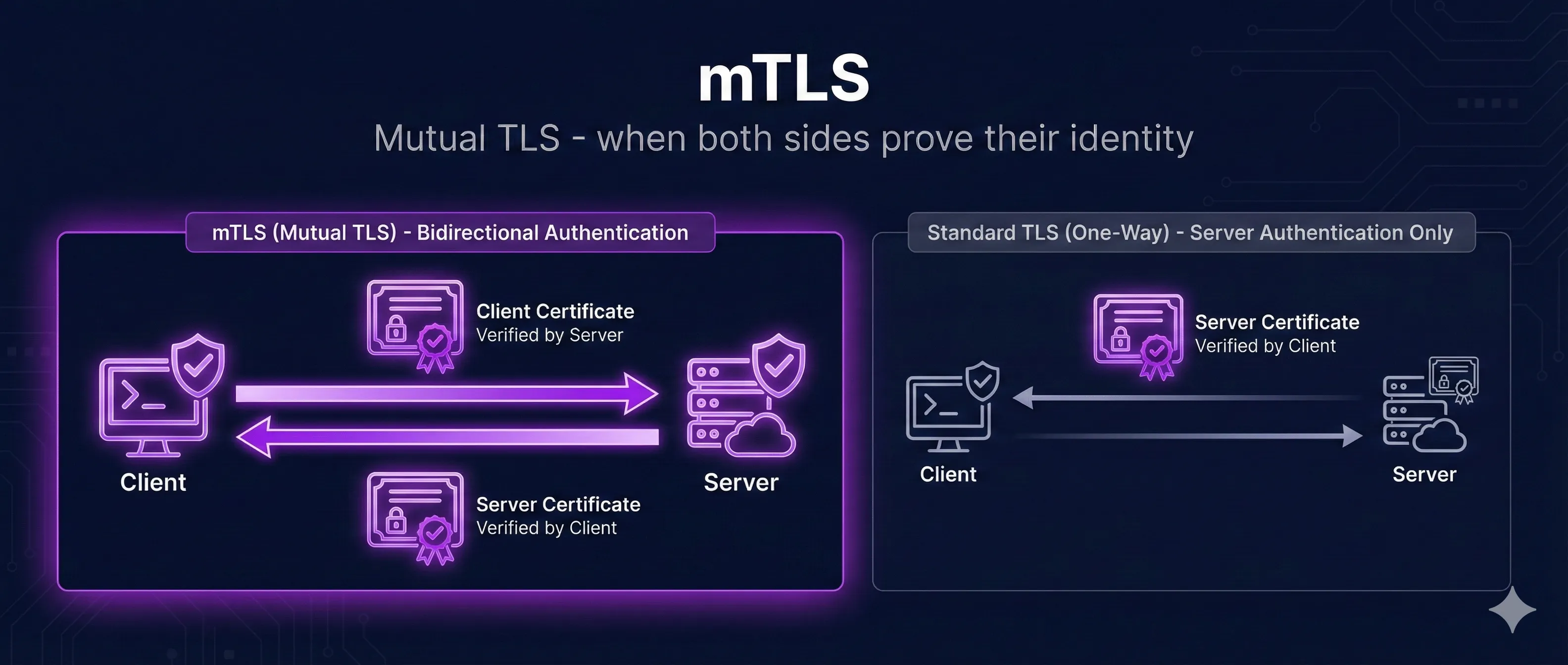
Quick Answer: What is mTLS?
Mutual TLS (mTLS) is TLS with two-way certificate authentication. Unlike regular TLS where only the server proves its identity, mTLS requires both the client and server to present and verify certificates.
Regular TLS
Mutual TLS (mTLS)
mTLS provides cryptographic proof of client identity—no passwords or API keys that can be stolen, phished, or brute-forced.
TLS vs mTLS: Key Differences
TLS vs Mutual TLS (mTLS)
Standard TLS
No cert
Has cert
Client verifies server only
Mutual TLS (mTLS)
Has cert
Has cert
Both sides verify each other
| Aspect | Regular TLS | mTLS |
|---|---|---|
| Server Certificate | Required | Required |
| Client Certificate | Not used | Required |
| Server Authentication | Certificate verification | Certificate verification |
| Client Authentication | Username/password, API key, etc. | Certificate verification |
| Credential Theft Risk | Possible (phishing, leaks) | Private key never transmitted |
| Setup Complexity | Low | Higher (PKI required) |
How mTLS Authentication Works
mTLS extends the standard TLS handshake to include client certificate verification. Here's the complete flow:
mTLS Handshake Flow
Client initiates connection
Server sends its certificate
Server requests client cert
Client sends its certificate
Client proves key ownership
Encrypted session established
- 1. Client Hello: Client initiates connection, sends supported cipher suites
- 2. Server Hello: Server responds with chosen cipher suite and its certificate
- 3. Certificate Request: Server requests client's certificate
- 4. Client Certificate: Client sends its certificate to the server
- 5. Certificate Verify: Client proves ownership of private key
- 6. Server Verification: Server validates client cert against trusted CAs
- 7. Finished: Both parties exchange encrypted Finished messages
- 8. Application Data: Secure, mutually authenticated connection established
Key Security Point
The client's private key never leaves the client device. The server verifies the client's identity by checking that the client can sign a challenge with the private key that matches the presented certificate.
When to Use mTLS
When to Use mTLS
Service-to-Service
Microservices authenticating each other
Zero Trust
Never trust, always verify identity
API Security
Replace API keys with certificates
IoT Devices
Device identity verification
Ideal Use Cases
1. Microservices Communication
Service-to-service authentication in Kubernetes, service meshes (Istio, Linkerd), and distributed systems. Each service has its own identity.
2. Zero Trust Architecture
When you can't rely on network perimeter security. Every connection must prove identity—even internal traffic.
3. API Authentication
High-security APIs where API keys aren't sufficient (financial services, healthcare, government). Client certificates can't be easily stolen or shared.
4. IoT Device Authentication
Authenticating thousands of devices where individual passwords are impractical. Each device gets a unique certificate.
5. Partner/B2B Integrations
When connecting with external partners who need guaranteed identity verification beyond API keys.
When NOT to Use mTLS
- • Public websites with anonymous visitors (browsers handle client certs poorly)
- • Consumer-facing applications (certificate management is too complex for end users)
- • Systems without proper PKI infrastructure
- • When simpler authentication (OAuth, API keys) meets security requirements
Implementing mTLS
Nginx Configuration
# Nginx mTLS configuration
server {
    listen 443 ssl;
    server_name api.example.com;

    # Server certificate (standard TLS)
    ssl_certificate /etc/nginx/certs/server.crt;
    ssl_certificate_key /etc/nginx/certs/server.key;

    # Client certificate verification (mTLS)
    ssl_client_certificate /etc/nginx/certs/ca.crt;
    ssl_verify_client on;  # Require client certificate
    # Use 'optional' to allow but not require

    # Optional: Verify certificate depth
    ssl_verify_depth 2;

    location / {
        # Pass client certificate info to backend
        proxy_set_header X-Client-Cert $ssl_client_cert;
        proxy_set_header X-Client-DN $ssl_client_s_dn;
        proxy_pass http://backend;
    }
}
curl with Client Certificate
# Make request with client certificate
curl --cert client.crt --key client.key \
     --cacert ca.crt \
     https://api.example.com/secure

# Using PKCS#12 file (combined cert + key)
curl --cert-type P12 --cert client.p12:password \
     https://api.example.com/secure
Node.js Server
const https = require('https');
const fs = require('fs');

const options = {
  key: fs.readFileSync('server.key'),
  cert: fs.readFileSync('server.crt'),
  ca: fs.readFileSync('ca.crt'),
  requestCert: true,       // Request client certificate
  rejectUnauthorized: true // Reject invalid certificates
};

const server = https.createServer(options, (req, res) => {
  const cert = req.socket.getPeerCertificate();
  if (req.client.authorized) {
    res.writeHead(200);
    res.end(`Hello ${cert.subject.CN}`);
  } else {
    res.writeHead(401);
    res.end('Client certificate required');
  }
});

server.listen(443);
Client Certificate Management
Generate Client Certificates
# Generate client private key
openssl genrsa -out client.key 2048

# Create CSR for client
openssl req -new -key client.key -out client.csr \
  -subj "/CN=client-service/O=MyOrg"

# Sign with your CA
openssl x509 -req -in client.csr \
  -CA ca.crt -CAkey ca.key -CAcreateserial \
  -out client.crt -days 365 \
  -extfile <(echo "extendedKeyUsage=clientAuth")

# Create PKCS#12 bundle (for browsers/Java)
openssl pkcs12 -export -out client.p12 \
  -inkey client.key -in client.crt \
  -certfile ca.crt
Certificate Lifecycle Best Practices
- • Short validity: 90 days to 1 year max for client certs
- • Automated rotation: Use tools like cert-manager, Vault, or SPIFFE
- • Unique per client: Each service/device gets its own certificate
- • Revocation ready: Maintain CRL or OCSP for emergency revocation
- • Secure storage: Private keys in HSMs or secure vaults
Troubleshooting mTLS
Error: "certificate required"
Client didn't present a certificate.
Fix: Ensure client is configured with --cert and --key flags, or certificate is loaded in the application.
Error: "unknown ca" or "unable to verify"
Server doesn't trust the client's CA.
Fix: Add client's CA certificate to server's ssl_client_certificate configuration.
Error: "certificate verify failed"
Certificate signature or chain is invalid.
Fix: Verify certificate chain is complete. Check cert was signed by the correct CA.
Error: "key mismatch"
Private key doesn't match certificate.
Fix: Regenerate CSR from the correct private key, or regenerate both key and certificate.
Debug Commands
# Test mTLS connection
openssl s_client -connect api.example.com:443 \
  -cert client.crt -key client.key -CAfile ca.crt

# Verify certificate chain
openssl verify -CAfile ca.crt client.crt

# Check key matches certificate
openssl x509 -noout -modulus -in client.crt | openssl md5
openssl rsa -noout -modulus -in client.key | openssl md5
# Both should output the same hash
Frequently Asked Questions
Can mTLS work with public CAs like Let's Encrypt?
For server certificates, yes. For client certificates, you typically need your own private CA because public CAs don't issue client certificates for arbitrary use.
How do I revoke a client certificate?
Use CRL (Certificate Revocation List) or OCSP. Configure your server to check revocation status. In emergencies, you can also update your CA trust store to exclude the compromised certificate.
What's the performance impact of mTLS?
mTLS adds one extra certificate verification during handshake (~1-2ms). For long-lived connections or connection reuse, the overhead is minimal. For many short connections, consider connection pooling.
Can I use mTLS with gRPC?
Yes! gRPC has excellent mTLS support. Configure the server with ServerCredentials and clients with ChannelCredentials, both including certificate paths.
How do service meshes handle mTLS?
Service meshes like Istio and Linkerd automatically handle mTLS between services. They provision certificates via SPIFFE/SPIRE and rotate them automatically—no manual certificate management needed.
Related Resources
TLS Handshake Deep Dive
Understand the cryptographic handshake that mTLS builds upon.
How TLS Works
Complete guide to TLS encryption, authentication, and integrity.
Certificate Pinning
Add an extra layer of security by pinning to specific certificates.
Extended Key Usage
Learn how EKU extensions define certificate purposes for client and server auth.
CA Hierarchy Design
Design and deploy root and intermediate CAs for your mTLS infrastructure.
SPIFFE & SPIRE Workload Identity
Automate mTLS identity for services and AI agents with short-lived, auto-rotated certificates.
Go deeper with hands-on PKI training
mTLS builds on PKI fundamentals — client certificates, CA trust chains, and certificate lifecycle management. Our structured training tracks cover these foundations and more, so you can implement mTLS with confidence.
Ready to See mTLS in Action?
Our interactive demo visualizes the complete mTLS handshake, showing how both client and server certificates are verified step by step.
Launch Interactive Demo